Website Down!? Monitoring Uptime, SSL, and Status History
You're working, focused on a task. A client messages: "The site isn't working."
You check — it's down. No idea when it happened. The logs might have nothing. The client doesn't know either.
Maybe an hour ago. Maybe overnight. During that time, people visited, saw an error, and left. Without a word.
And if there's no monitoring system — it'll keep happening.
Why This Happens
Agencies typically manage a number of client sites — anywhere from a few to dozens. Each one runs on its own.
Checking each one manually isn't realistic. So you find out about an outage either from the client or by accident.
Same for business owners managing multiple sites with no alert system: you simply don't know if they're all up right now.
No system — no control.
What Is Uptime Monitoring
Simple: the system automatically checks a site at a set interval — say, every few minutes.
If it doesn't respond — you get an alert. Immediately, not an hour later.
It records whether the site responds, how fast, and what status code it returns. Every outage logged with a start time. When the site recovers — a separate notification.
SSL Certificates: The Silent Risk
An SSL certificate expires. The browser shows a red warning. The user sees "Not secure" and closes the tab.
Google notices too.
Renewing on time is easy — if you know when. But when you have dozens of certificates, it's easy to miss one. Monitoring shows how many days are left for each and sends a notification in advance.
Why I Built DigiPulse
I run several of my own projects and maintain third-party sites.
Existing tools are either overloaded with features I don't need, or they're missing what I actually want — the right information, a clean view, a reasonable limit on monitored objects.
I needed a dashboard: open it, see the state of all sites. Nothing extra.
That's how DigiPulse was born.
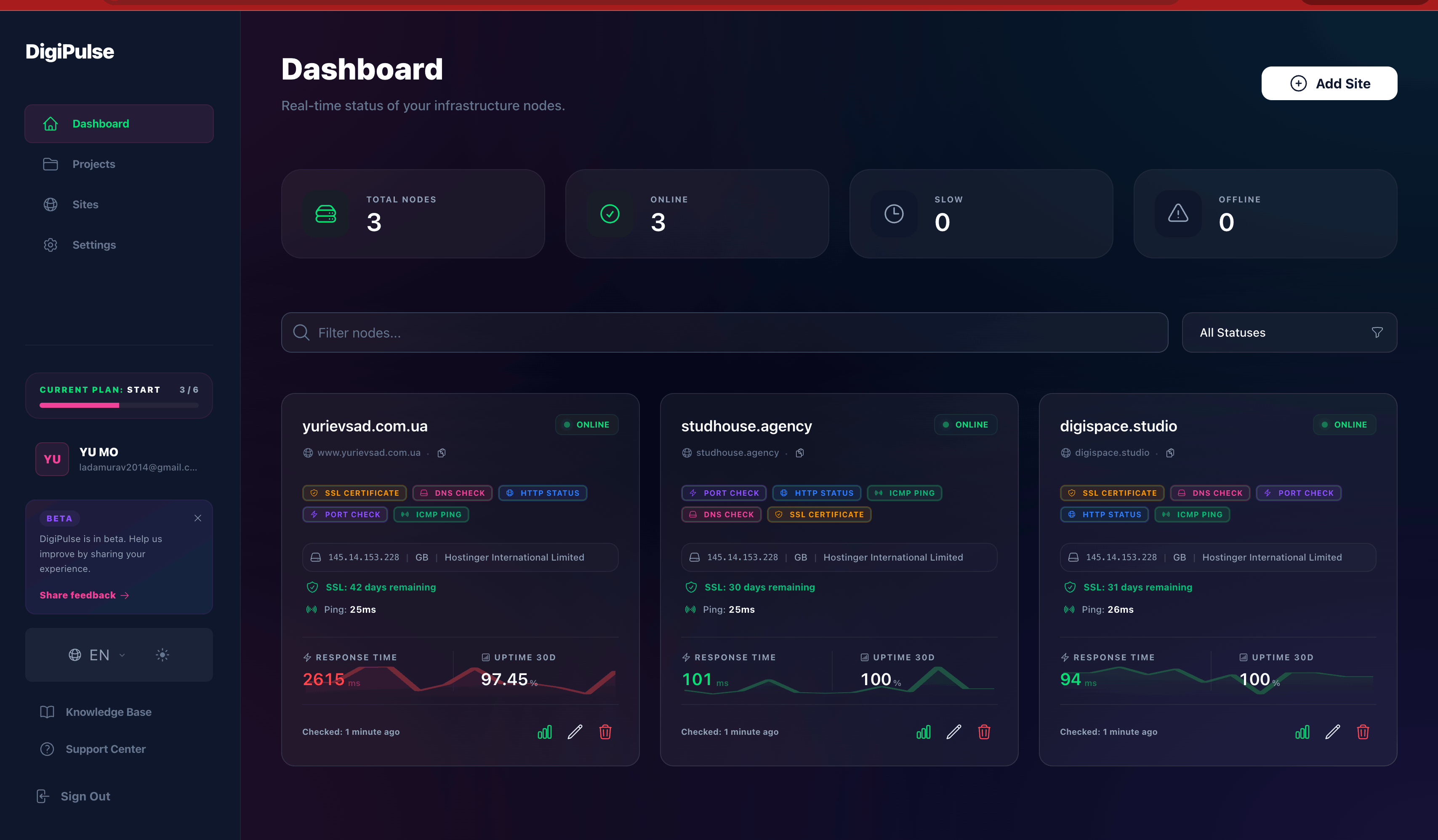
What DigiPulse Tracks
Uptime — whether the site is up and for how long. Every outage with an exact start time.
SSL — how many days until the certificate expires. Alert arrives in advance.
Status history — when it went down, how long, how often. You can tell whether it's a recurring issue or a one-off.
Alerts via Telegram or email — sent after the problem is confirmed, no false positives.
MCP integration — connects to Claude, Cursor, and other AI tools. Query site status directly from there, without opening the dashboard.
Who It's For
Agencies managing client sites who want to know about problems first.
Business owners without a dedicated person for monitoring.
Try It
DigiPulse is in beta. If you manage client sites or have your own — give it a try and let me know what you think.
Laravel for E-commerce: From Packages to Headless Architecture
For most companies, a website is no longer just an online office or a digital showcase—it is part of the core business process, especially for online stores, marketplaces, and service-based platforms. Ready-made solutions like Shopify, WooCommerce, or Magento are excellent for quick launches, but they often reach their limits once a business needs custom order processing, multi-warehouse inventory management, or unique pricing rules tailored to specific requirements.
This is where Laravel shines. As a robust PHP framework, it combines structure with freedom: you can keep the codebase clean, extend functionality with community packages, or build fully custom features from scratch. In this article, we explore how Laravel supports flexible e-commerce solutions, with practical notes on architecture, recommended packages, and deployment practices.
Why Choose Laravel for E-commerce?
Laravel provides the flexibility to build custom features while leveraging an ecosystem of thousands of community packages. This balance makes it a strong foundation for e-commerce platforms, offering more freedom and scalability than most popular CMS solutions.
- Open-Source Advantage—Full control over the codebase enables deep customization and continuous innovation.
- Scalability—Adapts to growing business needs, from higher traffic to larger product catalogs and complex workflows.
- Security—Built-in protection against CSRF, SQL injection, and XSS helps safeguard sensitive customer data.
- MVC Architecture—A clean, organized structure that speeds up development, simplifies maintenance, and improves collaboration.
- Extensive Ecosystem—Thousands of community packages accelerate delivery, lower costs, and prevent reinventing the wheel.
- Flexible Storefronts (Headless Approach)—Decouples the frontend from the backend so one system can power multiple storefronts—from websites to mobile apps—with greater flexibility, security, and performance.
- API-First Approach—Makes it straightforward to build APIs for seamless integration with storefronts, mobile apps, and third-party services.
Headless E-commerce with Laravel
A headless e-commerce architecture separates the customer-facing frontend from the backend business logic and data handling, providing significant benefits:
- Flexibility—Choose modern frontend technologies like Vue.js, React, or Angular to craft tailored user experiences.
- Performance—Faster page loads and improved responsiveness lead to higher customer satisfaction.
- Omnichannel Presence—Deliver consistent shopping experiences across web, mobile apps, and even IoT devices.
- Enhanced Security—Isolating backend logic from the presentation layer reduces the overall attack surface.
Laravel-based packages such as LunarPHP facilitate headless commerce with a robust RESTful JSON:API and an intuitive Livewire-powered admin panel.
Popular Laravel E-commerce Packages
Selecting the right Laravel package can significantly speed up development and ensure essential capabilities are covered. Here’s a quick overview:
- Bagisto—Open-source platform supporting marketplaces, multi-store setups, PWAs, and B2B commerce.
- Lunar—Ideal for headless solutions with clean architecture, JSON:API, and robust management capabilities.
- Aimeos—High-performance, API-first solution suitable for large-scale e-commerce, marketplaces, and B2B scenarios.
- Vanilo—A streamlined framework emphasizing Laravel’s simplicity for quick, efficient projects.
- AvoRed—Modular, customizable shopping cart for tailored functionality.
- Laravel Shopping Cart—Straightforward package for basic cart implementations.
- Cashier—Integrates subscription billing with Stripe or Paddle.
- Laravel PayPal—Provides seamless PayPal payment integration.
Laravel vs. Ready-made CMS: Comparison
| Feature | Laravel E-commerce Packages | Ready-made CMS (Shopify, WooCommerce, Magento) |
|---|---|---|
| Customization | High; complete code control | Limited by themes/plugins |
| Scalability | Highly scalable | Varies based on CMS |
| Security | Requires careful implementation | Managed by CMS; frequent updates |
| Development Time | Longer; coding expertise required | Shorter; quick setup and out-of-the-box functionality |
| Cost | Potentially lower in the long term | Subscription/transaction fees accumulate |
| Technical Skill | Requires skilled Laravel developers | Manageable with less technical knowledge |
Final Thoughts
Laravel offers a flexible, future-proof foundation for e-commerce. By combining clean architecture, a rich package ecosystem, and support for modern patterns like headless commerce, it enables secure, scalable, and fully tailored solutions. Whether you are starting with a simple store or building a complex multi-channel platform, Laravel provides the tools and ecosystem to bring that vision to life—without being boxed in by the limits of ready-made platforms.
“Ready-made platforms limit growth. Laravel opens the door to tailor-made e-commerce that scales with your business.”
🚀 Build Your Next E-commerce with Laravel
Thinking about building or scaling your e-commerce platform? At DigiSpace, we help businesses design tailored Laravel solutions—from architecture and package selection to deployment and optimization.
Contact Us TodayMastering Content for Website Development

With the digital landscape becoming more competitive by the day, a well-designed website isn't enough to guarantee success. A website needs more than a visually appealing interface to attract and retain its visitors. It needs high-quality, relevant content. Website content development is an indispensable aspect of creating a robust online presence. In this article, we delve into the world of website development content, examining the integral role content plays in the development process, and how a strong content strategy can fuel your website's success.
Understanding the Role of Content in Website Development
Website content and development are two sides of the same coin. While the development aspect focuses on the site's design and functionality, content addresses the information that fills the site. Content for website development could range from informative blog posts and product descriptions to multimedia such as videos and infographics.
Compelling content not only engages your audience but also plays a vital role in enhancing your site's visibility on search engines. The adage "Content is King" holds, with search engine algorithms favoring sites with relevant, high-quality content.
Strategies for Content Development for a Website
A content development website strategy goes beyond merely writing text and includes planning, creating, sharing, and optimizing relevant, engaging, and consistent content to attract and retain a clearly defined audience. Here are a few key strategies for effective content development:
- Know Your Audience: The first step in any content strategy is understanding your target audience. Their needs, preferences, and behaviors should guide your content creation process.
- SEO Optimization: Incorporating SEO into your content strategy ensures your content gets noticed by search engines. Use keywords appropriately, create quality backlinks, and ensure your content is easy to read and share.
- Regularly Update Content: Keep your content fresh and up-to-date. Regular updates not only keep your audience engaged but also signal to search engines that your website is active.
- Use a Variety of Content Types: Don't limit yourself to text. Use images, infographics, videos, and podcasts to cater to different audience preferences.
Building a Content Strategy for Website Development
An effective content strategy for website development addresses what content you will create, who it is for, and how it will be managed. It involves understanding your goals, conducting keyword research, defining your brand's voice, creating a content calendar, and measuring the results.
In conclusion, content development for a website is a critical aspect of your overall website strategy. By creating and sharing relevant, engaging, and optimized content, you can attract a larger audience, foster user engagement, and significantly improve your website's SEO ranking. Remember, in the digital world, content is indeed king!
Categories
Latest Posts
Archive